I designed and tested an AI-assisted workflow for No Signal Radio that turns a mood, reference song, or listening idea into a structured playlist, show draft, visual direction, voice script, and playback plan.
The project started with a simple problem: I love music, but my own playlists were starting to feel too familiar. I wanted a better way to discover music without handing taste over to an algorithm. The goal was not to automate curation. The goal was to build a repeatable system where human taste stays in control and AI helps with discovery, structure, and production.
Problem
Most music workflows stop at the playlist.
That works for listening, but it does not preserve the thinking behind the playlist. The mood, sequence, notes, artwork direction, voice intro, and scheduling logic often live in separate tools or disappear completely after the playlist is made.
For No Signal Radio, I wanted to build something more durable. A playlist should be able to become a structured radio-style object: something with a title, description, vibe statement, track list, show notes, artwork prompt, voice intro script, external playlist link, and playback metadata.
The larger challenge was figuring out where AI actually helped. I did not want AI to replace taste or flatten the music into generic recommendations. I wanted to use it as a support layer for research, naming, sequencing, metadata, voice scripts, and production steps while keeping the final direction human-led.
Approach
I treated No Signal Radio as a workflow system, not just a collection of playlists.
Each playlist starts with a creative input: a mood, room tone, time of day, memory, setting, or single reference track. From there, AI helps expand the idea, suggest related music, organize the listening direction, draft show notes, write an intro script, and generate visual prompt directions for playlist artwork.
The workflow separates tasks by the tool best suited for each job. ChatGPT supports creative direction, track discovery, playlist framing, show descriptions, voice intro scripts, metadata, and image prompt writing. Browser-based automation supports logged-in tasks such as building playlists in Amazon Music, setting playlists to public, working with visual generation tools, and collecting share links.
WordPress REST API workflows support the structured publishing side. Instead of relying on fragile manual entry, the system can create Radio Show drafts through the API and write structured fields for description, vibe statement, notes, AI voice script, list type, and track rows.
I also started building a playlist bank so shows could be organized by title, URL, tags, daypart, energy, active status, preferred slot, duration, and notes. That made it possible to think beyond one playlist at a time and toward a rotating station schedule.
What I Built
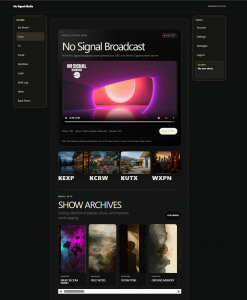
I built and proved the foundation for an AI-assisted radio publishing workflow.
The system can take a loose playlist concept and turn it into structured show content for No Signal Radio. Each show can include a title, short description, vibe statement, notes, list type, track list, visual prompt direction, AI voice intro script, and external playlist link.
I confirmed a WordPress REST API workflow for creating Radio Show drafts on No Signal Media. This moved the process away from manual copy and paste and toward a repeatable content pipeline. The safe rule is draft-only unless publishing is explicitly approved.
I created structured playlist data that can support both editorial publishing and scheduled playback. That data can become a show page, archive card, featured playlist, schedule item, or future automation source.
I also started a local playback planning system for radio-style rotation. The working direction is a playlist bank that can rotate shows by time of day, energy, preferred slot, and schedule logic, with generated audio breaks mixed in as station elements.
The browser workflow was documented as well. Amazon Music playlists need clean naming, public sharing, copied URLs, and verification after each step. Visual and voice tools also require clear production rules, because those steps still depend on external services and logged-in browser sessions.
The full system is still in progress, but the core proof is working: AI can help shape a playlist, the playlist can become structured data, and that data can become a WordPress Radio Show draft.
Outcome
The project proved that No Signal Radio can be more than a playlist page. It can become a repeatable publishing and playback system built around taste, structure, and workflow.
The strongest lesson was that AI is most useful when it supports human judgment instead of replacing it. It helped with discovery, organization, naming, metadata, show copy, voice scripting, and production prompts, but the value of the playlist still came from curation.
The project also clarified an important technical pattern: structured work should happen through the REST API first, while browser automation should be reserved for tasks that truly require a browser, such as Amazon Music, image generation tools, and voice platforms.
The current system is not finished, but it has a working foundation. It can support playlist creation, show drafting, metadata organization, visual prompt development, and the early structure for scheduled playback. The next step is to tighten the playlist database, finish the hourly playback logic, and connect the full pipeline from curated playlist to public-facing No Signal Radio entry.
Tools Used
ChatGPT, Codex, Comet Assistant, WordPress, WordPress REST API, ACF, custom post types, Amazon Music, Leonardo AI, ElevenLabs, Piper TTS, Node.js, PowerShell, OBS