Problem
Working with AI made it easier for me to move fast, but it also created a new problem.
I could start a feature, build a workflow, test an idea, or get a strong plan in place, then come back a day or two later and lose track of where I was. The work was real, but the project memory was scattered across chats, notes, source files, screenshots, and half-finished implementation steps.
I did not need a full project management platform. I needed a recovery map.
The goal was to build a system that could answer a few simple questions:
Where was I?
What is already done?
What is partially started?
What is actually blocked?
What is the next useful step?
The challenge was keeping the system practical. It needed to support real AI-assisted work without turning into busywork or another tool I would forget to update.
Approach
I treated Back Room Active Plan as an internal project recovery system, not traditional project management software.
The structure was kept simple on purpose. Each project needed a clear purpose, current focus, next action, and a set of ordered steps. Each step needed a stable ID, a label, a status, a plain description, and a next action that could be handed back to Codex or picked up later.
The system was designed around the way I actually work. I often start in the middle of a project, return after time away, and need to inspect what already exists before making the next move.
So the planning rules became part of the workflow:
Do not invent a clean plan from scratch.
Check the actual project sources first.
Mark finished work as complete.
Mark partially started work as in progress.
Only mark something blocked when there is a real blocker.
Keep the next action concrete enough to continue the build.
This gave the system a practical role. It was not there to manage everything. It was there to help me recover momentum.
What I Built
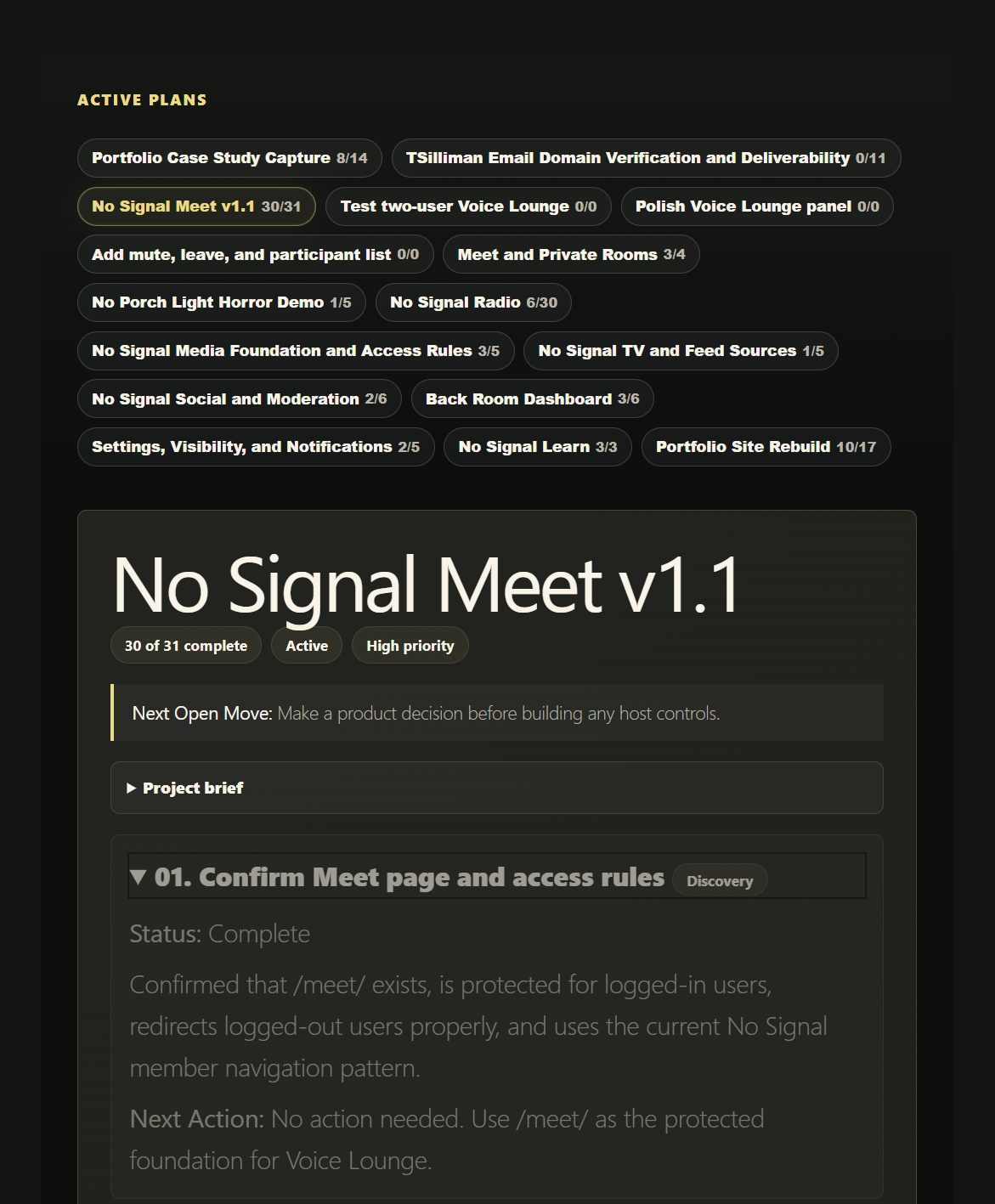
I built a Back Room planning structure inside No Signal Media for active projects, roadmap steps, next actions, and recovery notes.
The system includes:
A structured project roadmap format using JSON.
Project records with status, priority, purpose, current focus, and next action.
Ordered project steps with stable IDs, labels, descriptions, statuses, and next actions.
A practical status model for active, paused, waiting, complete, open, in progress, blocked, and paused work.
A reusable prompt for creating project recovery maps from real project context.
A workflow for turning prior chats, notes, source files, logs, and implementation state into an import-ready plan.
A Back Room dashboard direction focused on open steps, active projects, and clear next actions.
The goal was not to build a heavy management system. The goal was to create a place inside No Signal Media where project state could be recovered and continued.
Outcome
Back Room Active Plan gave me a clearer way to return to unfinished work.
Instead of trying to remember every project from memory, I can create or update a roadmap that shows what exists, what is done, what is in progress, and what should happen next.
The system helps turn scattered AI-assisted work into something easier to resume. It keeps the focus on recovery, not management. That makes it useful for a solo builder working across multiple features, experiments, and client-style systems at the same time.
This case study shows one of the practical challenges of working with AI: moving fast is easy, but keeping track of the work becomes its own problem. Back Room Active Plan was my way of solving that inside the platform I was already building.
Tools Used
WordPress, custom post types, custom fields, PHP, JSON, structured prompts, Codex, ChatGPT, project notes, implementation logs, and AI-assisted planning workflows.